
Steps
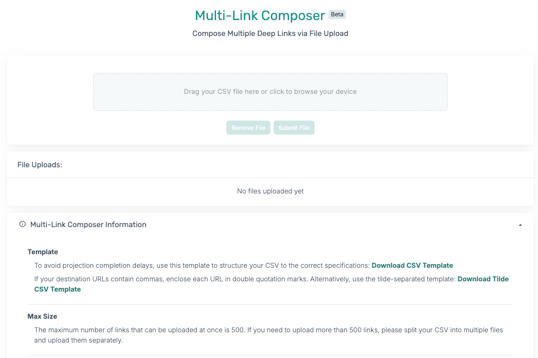
- Download the template. In URLgenius, go to Tools > Multi-Link Composer. Open the Multi-Link Composer Information section and click Download CSV Template.
- Open the template in Excel, Google Sheets, or any spreadsheet app. Keep the header row exactly as it is.
- Delete the example rows under the header.
- Add one row per link:
- Default Web URL (required): the destination, e.g. https://www.example.com/summer-sale
- Tags (optional): separate multiple tags with a semicolon, e.g. summer;email
- Path: your full multi-level path with slashes, e.g. summer/shoes/sale. Don't include the domain or a leading slash.
- Save the file as a CSV (File > Save As > CSV in Excel, or File > Download > CSV in Google Sheets).
- Upload the CSV. Back on the Multi-Link Composer page, drag the file into the upload box or click it to browse, then click Submit File.
- Wait for the job to finish. The file appears under File Uploads as In Progress. Refresh the page to check the status; it changes to Completed when your links are ready. This can take up to 2 hours.
- Find your link in the Console and click it once to confirm it opens the right page.
- Your account prefix may be added. Some accounts automatically put a prefix at the start of the path. For example, summer/shoes/sale could become urlgeni.us/yourprefix/summer/shoes/sale. Check the final link in the Console before sharing it.
- Paths must be unique. If a path is already taken, URLgenius adds a few numbers to the end.
- Up to 500 links per file. Split larger lists into several CSVs.
- URLs with commas must be wrapped in double quotes, or use the Download Tilde CSV Template instead.
- If the status shows Encountered Error, click the status to see which rows failed and why. The other rows are still created.